

Once our table/tables are set up in our database, we can begin to populate data into the table/tables.
Below is our table that was created:
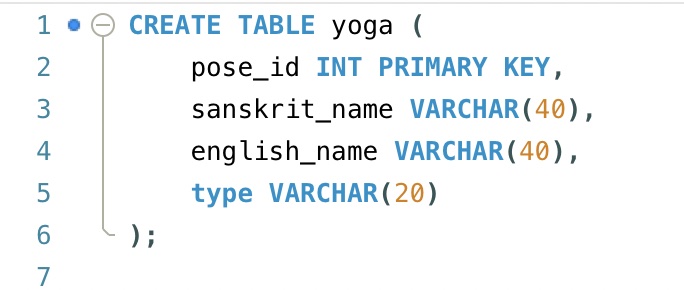
In order to insert data into this table, we start with the below statement:
INSERT INTO yoga VALUES ();Within the parenthesis is where we would enter in the values for each column for each row. So, let’s start with an example of inserting values for one row:

In order to enter in values for multiple rows, we would enter in the values of each row within parenthesis and separate them by commas:

If we do not include the values for all the columns, we would receive an error. So, if we only wanted to enter in values for specific columns of a row, we can indicate just the columns we want to insert values into. The columns that are not specified will have null values:

Let’s discuss some SQL constraints. Constraints limit the types of data that can be entered in a table. We’ll look at some constraints that are commonly used :
- NOT NULL – the column cannot have a null value
- UNIQUE – the values in the column must be unique (there cannot be duplicates)
- AUTO_INCREMENT – automatically generates a record number starting with 1 and increments up (unless set to start at a different number)
- DEFAULT – sets a default value when one isn’t specified
- PRIMARY KEY – cannot be null and must be a unique value, serves as the unique identifier for a row
Here’s a video reviewing these constraints:

 Catty Learns Code