
In order to query data from the database, we can use the SELECT statement. The retrieved data is a result-set. Whenever we use SELECT, we are basically telling the RDBMS the information that we want it to fetch for us.
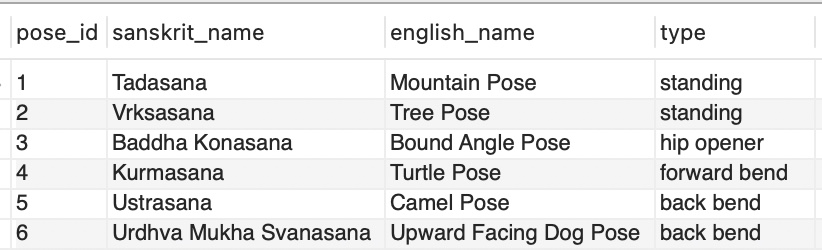
So let’s go over some examples. The below statement indicates that we want to select every column of the yoga table, and it will return all the existing data within it. The use of “*” represents “all”:
SELECT *
FROM yoga;
Below is the result when we execute the statement:
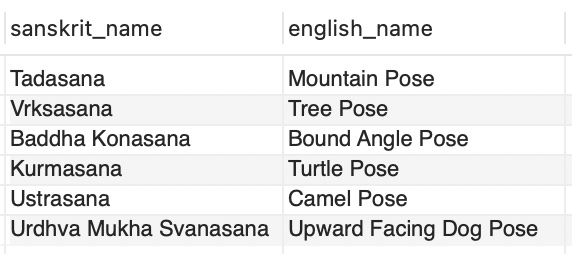
The next example indicates that we only want to query data from the sanskrit_name and english_name columns from the yoga table:
SELECT sanskrit_name, english_name
FROM yoga;
Here is the returned data from the query:
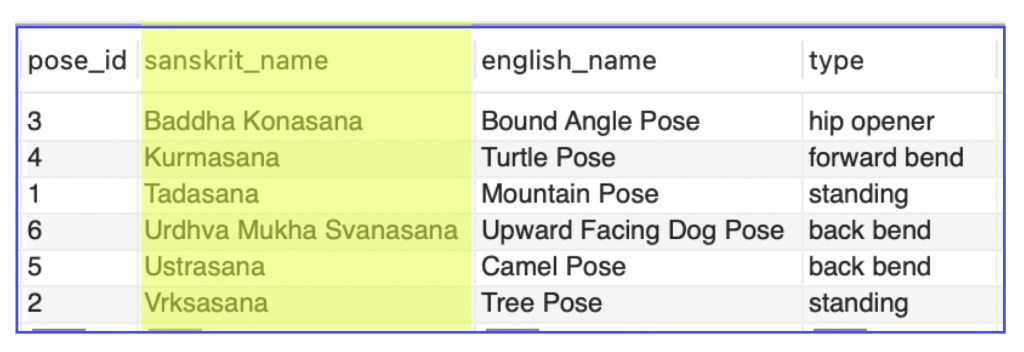
We can also make use of the ORDER BY clause. This sorts the results of a query in ascending or descending order based on the column we list. The default is by ascending order (ASC), and we do not have to explicitly indicate ASC. If we want to sort by descending order, we would have to type DESC.
So, if we run the below query, it will return data from all the columns in the yoga table, but it be ordered in ascending order (alphabetical) based on the sanskrit_name column (Notice that we do not have to type ASC after sanskrit_name):
SELECT *
FROM yoga
ORDER BY sanskrit_name;
Here are the results. The highlighted columns shows how the ORDER BY clause functions:
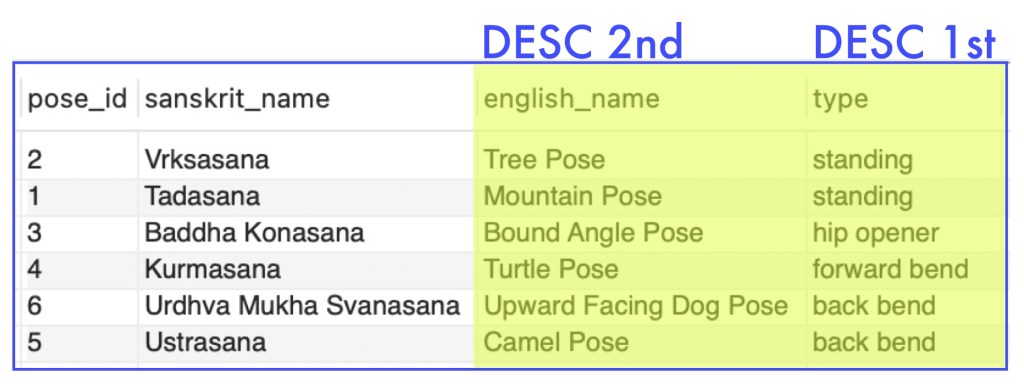
For the next example, we will look at how you can use the ORDER BY clause for multiple columns. We will be selecting the data from all the columns of the yoga table. Then we will first order the data by the type column in descending order, and then by the english_name column in descending order.
SELECT *
FROM yoga
ORDER BY type DESC, english_name DESC;
Below is our results from the query:
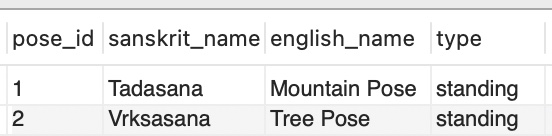
We can also use the LIMIT clause. This is helpful when working with a large set of data and we want to limit the number of records that is returned. This can also be used for pagination to display large amounts of data on separate pages. Our example below will result in only 2 rows of data once executed:
SELECT *
FROM yoga
LIMIT 2;
Here is the result:
We can also go a bit further to state that we want to retrieve just 2 rows of data by descending order from the pose_id column:
SELECT *
FROM yoga
ORDER BY pose_id DESC
LIMIT 2;
The result is the last two rows of data from our table since we indicated to order by descending order for the pose_id:

We can use the WHERE clause to filter out our data even more by specifying conditions to meet for the returned records.
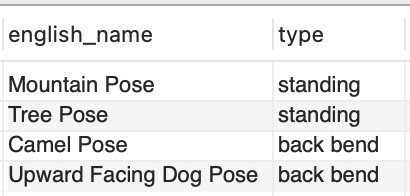
In the following example, we are stating that we want to retrieve the english_name column and type column from the yoga table where the type is either ‘standing’ or ‘back bend’:
SELECT english_name, type
FROM yoga
WHERE type = 'standing'OR type = 'back bend';
The result returns the following 4 rows for the specified columns that meet our criteria:
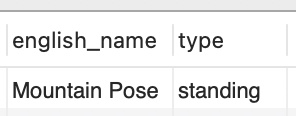
Below, we are filtering out our records even further from our previous example with our WHERE clause by stating that the english_name column must also be ‘Mountain Pose’:
SELECT english_name, type
FROM yoga
WHERE (type = 'standing'OR type = 'back bend') AND english_name = 'Mountain Pose';
When we execute the statement, we only return one row of data as it meets our conditions:
There are also various comparison operators :
<   less than
>   greater than
<=  less than or equal to
>=  greater than or equal to
=   equal to
<>  not equal to
Let’s see an example using some of these comparison operators to filter our records in a query. Below we are querying data from all columns in our yoga table for records where the pose_id is greater than or equal to 3 and the type is ‘back bend’:
SELECT *
FROM yoga
WHERE pose_id >= 3 AND type = 'back bend';
This is the result of our query, which returns 2 rows:

Let’s see the same example, but slightly modifying it so the type is not equal to ‘back bend’:
SELECT *
FROM yoga
WHERE pose_id >= 3 AND type <> 'back bend';
Here is our result:
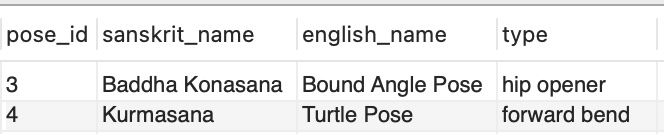
Let’s also see some examples using the IN operator. This is helpful to use in place of multiple OR conditions. So, the below example is querying all columns from the yoga table where the type is in the group of values listed inside the parenthesis, which are ‘back bend’, ‘forward bend’, or ‘hip opener’:
SELECT *
FROM yoga
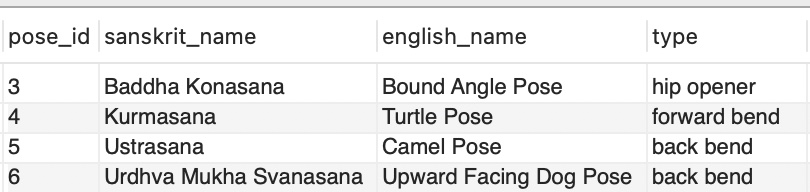
WHERE type IN ('back bend', 'forward bend', 'hip opener');
Here is the result of our query:
Let’s go over one more example with the IN clause. This query below will retrieve information from all the columns in the yoga table where the values of english_name are ‘Mountain Pose’, ‘Tree Pose’, or ‘Camel Pose’, as well as where the value of type is ‘standing’:
SELECT *
FROM yoga
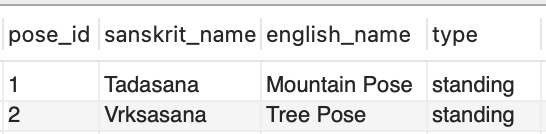
WHERE english_name IN ('Mountain Pose','Tree Pose', 'Camel Pose') AND type = 'standing';
Here is the the data our query returns:
Feel free to watch this video reviewing the examples of the SELECT statements discussed here:

 Catty Learns Code