

Up to this point, all the examples I worked with involved only one table and covered more of the basic and simpler concepts. As I move forward, I need a more complex schema in order to apply it to other examples. I have been working on an ER Diagram in order to plan out my Database Schema. The new schema will involve multiple tables and various relationships linking them together.
Before going further, ‘ER’ stands for ‘Entity Relationship’ . An entity is an object that we want to store information about and model. We can use an ER diagram to help us outline and build out the skeleton of our Database Schema.
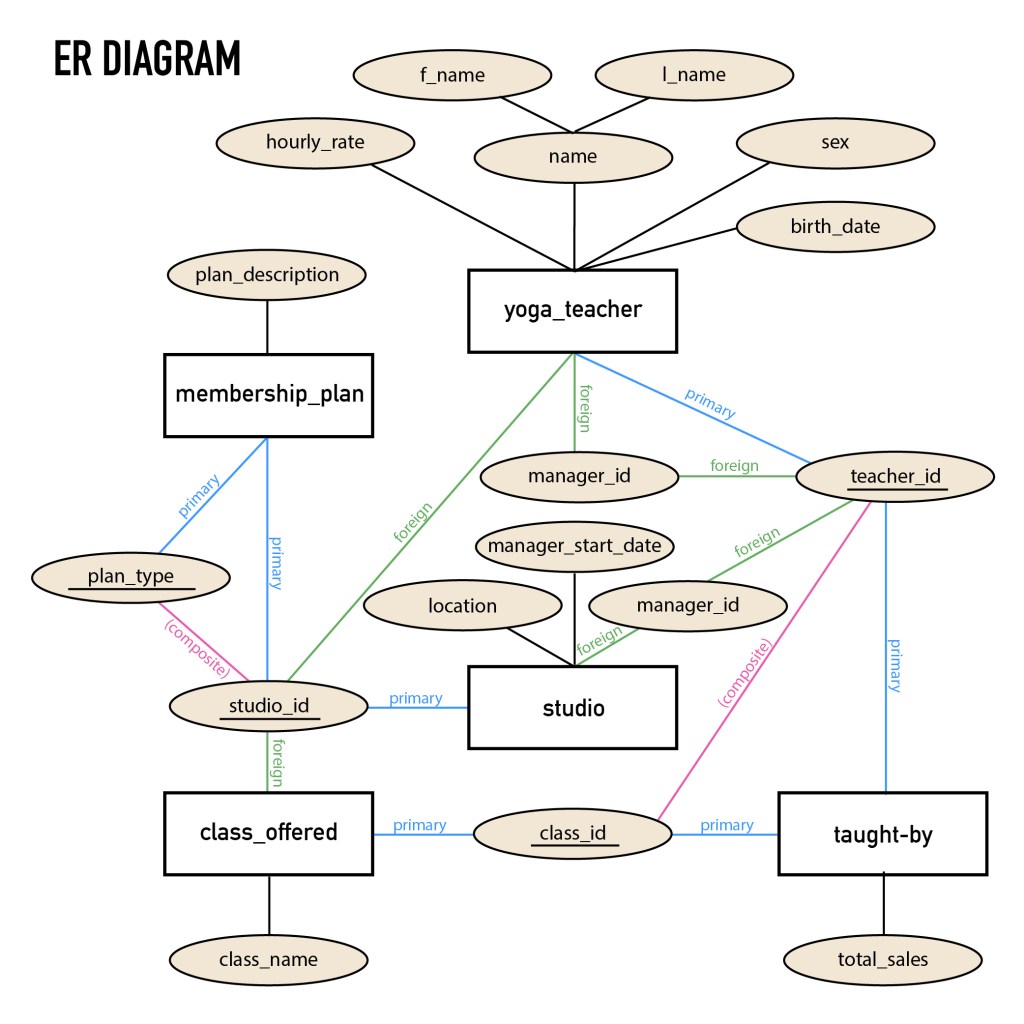
Below is the ER Diagram that I created. Throughout the process, I’ve had to rethink, reorganize, and remake this diagram multiple times. It has taken me much longer than I’d like to admit to plot everything out to the point where it makes sense (At least, here’s hoping). In all honesty, I’m not certain if my approach to creating this diagram is the proper way of doing things, but I tried.
So the plan is for 5 tables for a yoga database (yes, I’m sticking with the yoga theme), all interconnecting by defining the appropriate keys to create relationships. All the attributes for the tables have been outlined and there will be use of various datatypes.
So, once the ER Diagram was complete, giving me the overall picture of the table structures and relationships, I moved on to detailing the Database Schema on an excel spreadsheet.
Below you will see the 5 tables with all their columns defined. The color coding indicates which column/s are the primary keys, foreign keys, and attributes. The tables are populated with dummy data that I made up, which I’ll be inserting once I actually start the next step of getting everything in the system so we have information to work with.

To start off, we have the yoga_teacher table. The teacher_id serves as the primary key. Then the manager_id is a foreign key, but it references the teacher_id column within the same table. The studio_id is another foreign key, referencing the studio table. There are 3 yoga studios in different locations. Each one can be identified by its studio_id (primary key). There is a foreign key, manager_id, which relates to the teacher_id column in the yoga table. Then we have a class_offered table that lists all the classes that are available for each studio. The class_id is the primary key and the foreign key is the studio_id, allowing us to associate each class by their appropriate studio.
We also have a taught_by table, which has a composite key made up of the two columns, teacher_id and class_id, together serving as the primary key. The membership_plan table also has a composite key established by the combination of the studio_id and plan_type columns.
That’s a wrap for the time being. Next, I’ll be working on creating these tables with MySQL and inserting all of the coinciding data that has been outlined in the yoga database schema.
Happy learning :).
Here is a video reviewing the ER Diagram and the Database Schema from this post:

 Catty Learns Code