

Now that we have designed our database schema with the help of our ER diagram, we can create our database in the system (I’m using MySQL). For today, we are going to focus on creating all of our 5 tables that we’ll be working with for our database.
The database schema is shown below for easy reference as we work through getting them all set up:

We’ll start by creating the database and indicating that we want to use that database by running the below code:
CREATE DATABASE yoga;

USE yoga;
Now, we’ll create our first table, yoga_teacher, with the below code:
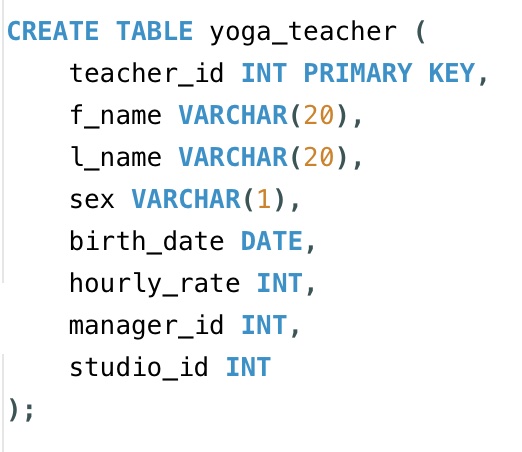
If we refer to the image of our schema at the very top of this post, we’ll see that the manager_id and studio_id column are foreign keys for the yoga_teacher table, but in the above code, they are not indicated as such. This is because the tables being referenced do not exist yet, so we can’t set them as foreign keys right away and we’ll have to define them later on.
Now, we will create the studio table with the below code:

Notice that here we are able to define our foreign key because we have first created the yoga_teacher table and so the studio table can be properly set up with the appropriate reference key. We’ll also indicate ‘ON DELETE SET NULL’ , which means that if a teacher_id that is being referenced is deleted, then that coinciding field for manager_id will be set to null since that reference doesn’t exist anymore.
Next, we will adjust the yoga_teacher table to add the foreign keys since both of the the tables we need to reference now exist. With the code below, we can alter the yoga_teacher table to add the foreign key for manager_id to reference the teacher_id in the same table. Then we can also indicate the foreign key referencing the studio_id column in the studio table.

So with our first two tables fully set up, we can go ahead and create our third table, class_offered. We have three columns to define here. The class_id is our primary key. The foreign key is the studio_id column which references the studio_id column in the studio table.

Our next table to create is taught_by. Here, we have two primary keys, which are the teacher_id and class_id columns. Both of them together make up a composite key. Only together can they serve as a unique identifier for the table. Note that the two primary key columns are also the foreign keys. The teacher_id column references the teacher_id column in the yoga_teacher table, and the class_id column references the class_id column in the class_offered table. We also will set these for ‘ON DELETE CASCADE’ rather than ‘ON DELETE SET NULL’ because since the columns together make up the composite key, we will want the row to be deleted (instead of being set to null) if the associated parent reference is deleted. Just a reminder that primary keys cannot be null and must be unique.

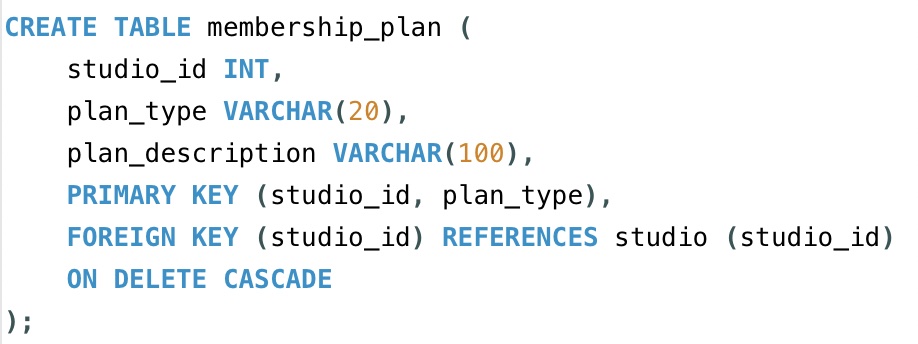
Now, let’s create our last table, membership_plan. Like the previous table we created, this one also has a composite key, which is made up of the studio_id and plan_type columns. However, this time, we only have the studio_id serving as the foreign key and we will also set this for ‘ON DELETE CASCADE’.
Ok, all our tables are now created in our database. The next step is to populate these tables with data.
Until then, friends :).
Here is a video for creating all the tables for our yoga database from this post:

 Catty Learns Code