

Here is the video going over SQL JOIN examples in this post (It may be easier to see the examples with each of their results) :
Before we dive in, I have the database schema included here below for easy reference just in case it helps (Note that the highlighted fields in bright yellow are from the adjustments that I made to the original set of data before I populated the database. It won’t affect anything here.):

Let’s start with discussing what a SQL JOIN clause is.
A join is when rows (records) from two or more tables in the database are combined according to related columns between those tables.
There are different types of joins:
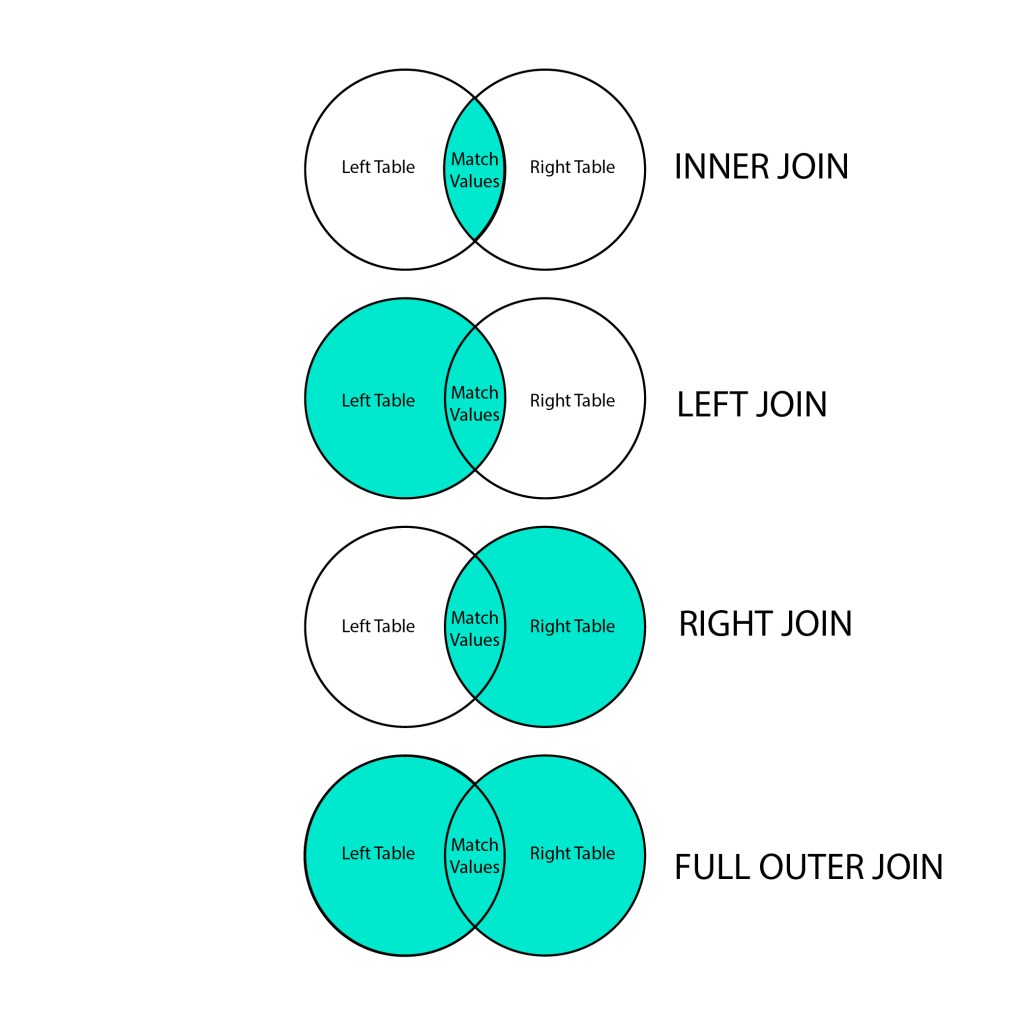
- INNER JOIN – this is the most commonly used join for queries. It retrieves records that have matching values in both tables involved in the join.
- LEFT JOIN – It retrieves all records from the left table, but only the matched record from the right table.
- RIGHT JOIN – It retrieves all records from the right table, but only the matched record from the left table.
- FULL OUTER JOIN – It retrieves all records from both the right and left tables when there is a matched record.
- SELF JOIN – It’s a regular join (using an INNER JOIN or LEFT JOIN clause) where a table is joined to itself based on some relation between its own columns. In other words, it is used to compare rows of the same table and it helps to display a hierarchy of data. An alias is used to assign different names to the table within the query.
The below image may help to visualize the data that is retrieved for each type of JOIN:
Now, let’s take a look at examples for these different joins.
Before jumping in, we’ll first insert another row into the studio table. This is really for the purpose of having additional data show up for our RIGHT JOIN example.
INSERT INTO studio VALUES(4, 'Brentwood', NULL, NULL);Also, the following examples for INNER JOIN, LEFT JOIN, and RIGHT JOIN will be the same statement with the only difference being the type of join. This will allow us to see how the results vary with each specific join.
Alright, we’ll start with INNER JOIN. Note that you can also type this as JOIN or INNER JOIN in the statement (they are interchangeable). The example below is retrieving the data from the f_name and l_name columns from the yoga_teacher table, as well as the location and manager_id columns from the studio table. Notice that the columns are prefixed with the appropriate table name for clarity on where to get the requested data. The table indicated by the FROM clause is considered the left table, and the table indicated by the JOIN clause is the right table. Through the INNER JOIN, we are retrieving the records that match the condition indicated after the ON clause. In this case, the condition is where the teacher_id from the yoga_teacher table matches the manager_id in the studio table, which results in the three records shown. This identifies the names of all the managers with their ids, as well as which location they manage.

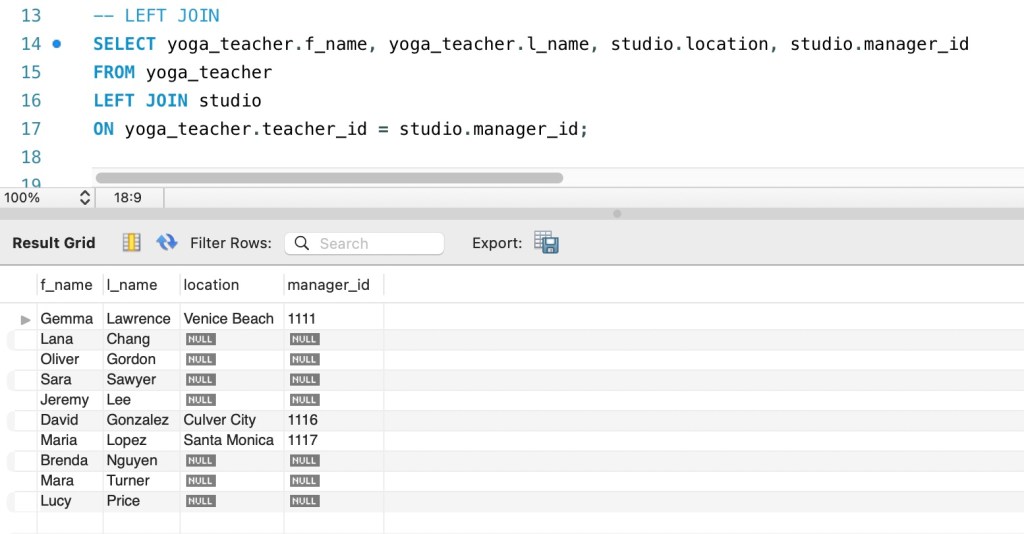
Next, let’s move into LEFT JOIN. Everything about the statement below is the same as we saw in the INNER JOIN example, except that this is now for a LEFT JOIN. So, if we take a look at the results, what we can see is that all the records from the left table for the specified columns have been retrieved regardless of a match, but only retrieved the records that matched the condition from the right table.
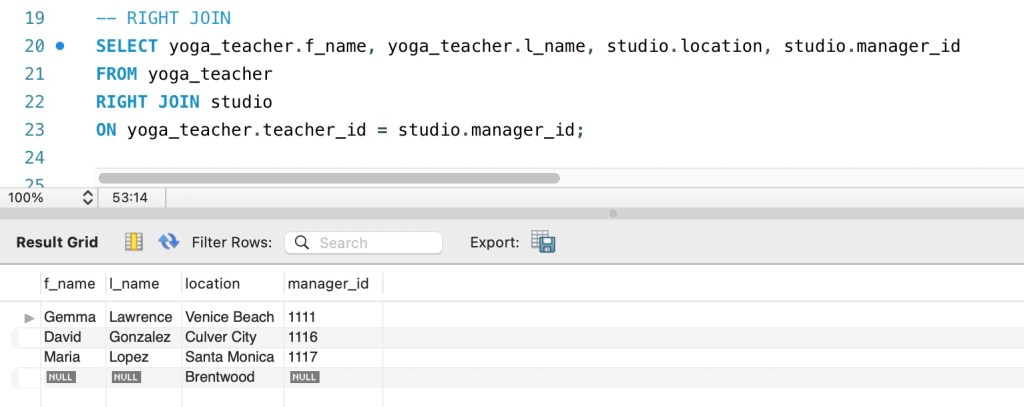
Now for the RIGHT JOIN example below, it is the same idea as the LEFT JOIN, but just the opposite. So, if we look at the results, we can see that all the records from the right table for the specified columns have been retrieved regardless of a match, but only retrieved the records that matched the condition from the left table. The only record that is not a match is the one that we inserted into the studio table at the very beginning, which was just to have additional data to work with so the example would make more sense for understanding the RIGHT JOIN.
Ok, so now we can take a look at FULL OUTER JOIN. Below is how we would write out the statement, which is the same as all our previous examples, except for the type of join. However, MySQL (which is what I’m using) does not support FULL OUTER JOIN, so we will work around it with the UNION operator.

By using the UNION operator, we will be able to retrieve the same data that we would through a FULL OUTER JOIN. So this example is really just combining two SELECT statements, the first statement being a LEFT JOIN and the second being a RIGHT JOIN. This will allow us to access all the records for the specified columns for both tables, as well as the matched records. The UNION operator will not retrieve duplicates (See previous post to learn more about the UNION operator).

Our final example shown below is for SELF JOIN, where we are joining the yoga_teacher table to itself in order to compare rows from the same table. Because we are using the same table name for the left and right, we need to assign an alias for each in order to be clear on which copy of the table we are referring to. So, the left table here is given the alias a, and the right table has the alias b. We are requesting data from the teacher_id, f_name, l_name, studio_id columns from table a, but only for records where the teacher_id from table a matches the manager_id from table b. The results show three records, which identifies the names and ids of all the teachers that are also managers, as well as which studio they manage. Note that by stating SELECT DISTINCT, we only return distinct values.

So, that’s a wrap for the JOIN clause. I hope this is helpful.
Thanks for learning with me, friends :).

 Catty Learns Code